
License
The license file is located in:
\Exaplan_Data\StreamingAssets\license.key
It is based on a hardware key and is locked and valid for only one machine.
To generate a license file, you need to request the key file from VIOSO and provide the hardware ID of your machine to: support@vioso.com.
How to retrieve a machine hardware key for VIOSO licensing
Section titled “How to retrieve a machine hardware key for VIOSO licensing”When starting Exaplan for the first time after setup, you will get the following error message:
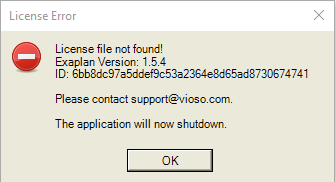
You can retrieve the hardware ID in the clipboard by pressing keyboard buttons CTRL + C.
Then in notepad or email you can paste the content of the message:
License Error---------------------------License file not found!Exaplan Version: 1.5.4ID: 6bb8dc97a5ddef9c53a2364e8d65ad8730674741
Please contact support@vioso.com.
The application will now shutdown.---------------------------OK---------------------------